

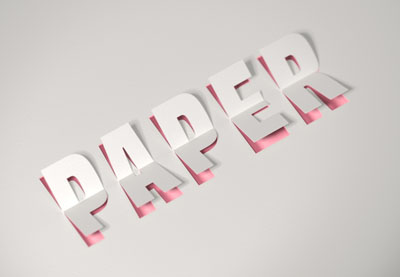
Nel tutorial che andremo a seguire viene mostrato come utilizzare gli strumenti e le impostazioni 3D di Adobe Photoshop, con alcuni livelli di regolazione, per creare un effetto di testo ritagliato in un foglio di carta 3D. Un ottimo esercizio che ci guiderà passo-passo a un bel risultato.
Related Posts
16
May2013
Use Puppet Wrap in Photoshop CS5
Un tutorial che parla di uno strumento nuovissimo di Photoshop presente nella versione CS5. Si tratta dello strumento Alterazione Marionetta (Puppet Wrap) che permette di manipolare figure inserendo degli snodi…
18
Jan2018

Create Easy X-Ray Effect in After Effects
In this interesting video tutorial we will see how to easily create an X-ray effect using the Adobe After Effects video editing program. A very detailed and easy to follow…
06
Nov2017

Create Dynamic Letter Animations in Cinema 4D
In this beautiful video tutorial we will travel through the process of creating some fantastic dynamic letter animations created using the Cinema 4D modeling and rendering program. A detailed lesson…
07
Mar2018
Model a 3D Elizabethan Rapier in Autodesk Maya
In this interesting video tutorial we will see how to create a beautiful 3D dueling sword using the Autodesk Maya modeling and rendering program. A very detailed and easy to…
11
Mar2019
Animate an Object Interacting with Smoke in Maya 2019
In this interesting video tutorial we will see how to animate a 3D object in Autodesk Maya 2019 making it interact with the smoke present in the scene, in particular…
15
Oct2016

Combine Text & Image in Adobe Photoshop
Un ottimo video tutorial in cui possiamo vedere come combinare immagini e testo i Adobe Photoshop per ottenere una bellissima composizione che può essere utilizzata in molti modi. Una lezione che…
